

Brands in Kitra control how your booking pages look and feel.
Instead of using a single default style, you can create custom brands to match your company, personal brand, or different clients.
You can find this section by going to:
Bookings → Brands
From here you can create and manage the branding used across your booking pages.
Creating a Brand
To create a new brand:
Go to Bookings → Brands
Click Create Brand
Add your brand details
Click Create Brand
Once created, the brand will appear in your list and can be used for your booking event types.
Brand Settings
When creating a brand, you can customize several elements of your booking page.
Brand Name
The brand name appears at the top of your booking page and is visible to visitors when they open your scheduling link.
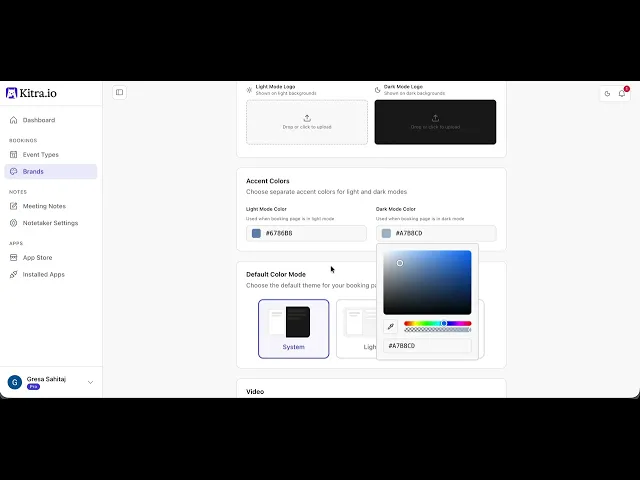
Logo (Light & Dark Mode)
You can upload two logo versions:
A logo for light backgrounds
A logo for dark backgrounds
Kitra automatically switches between them depending on the visitor’s device appearance.
Accent Colors
Accent colors control the visual highlights of your booking page, including buttons and selected elements.
You can set different colors for light mode and dark mode.
Default Color Mode
You can choose how your booking page appearance behaves:
System – Follows the visitor’s device settings
Light – Always shows the light version
Dark – Always shows the dark version